在近期频繁部署与调试KLEE、数据库镜像及私有 Registry 等 Docker 环境的过程中,我反复遭遇 Docker Hub 直连拉取速度极不稳定的问题:在国内网络条件下,镜像下载速率常年波动于几十 KB/s 至数百 KB/s 之间,即便在较理想状态下也难以持续超过 1–2 MB/s,导致一个 2GB 级镜像的拉取时间往往需要 30–70 分钟,且具有显著不可预测性。尽管尝试过公共镜像加速源、第三方镜像站及内网代理等常见方案,但这些方式普遍存在限速、间歇性失效、403/429 错误频发或服务不可持续等问题,无法满足在关键实验节点对镜像拉取时效性与稳定性的基本要求。在此背景下,我放弃了继续依赖公共加速基础设施的思路,转而采用完全可控的方案:使用一台按量计费的境外 VPS,自建一个工作于 Registry v2 proxy 模式的 Docker Hub 反向代理节点,仅在需要拉取镜像时启动实例,用完即关机,从而以极短运行时间换取高带宽带来的确定性下载速率,并将总成本限制在可量化、可预测的范围内。本文记录该方案复现部署过程,并在实现过程中借助 Claude 完成了主要编程工作。
配置好之后的效果
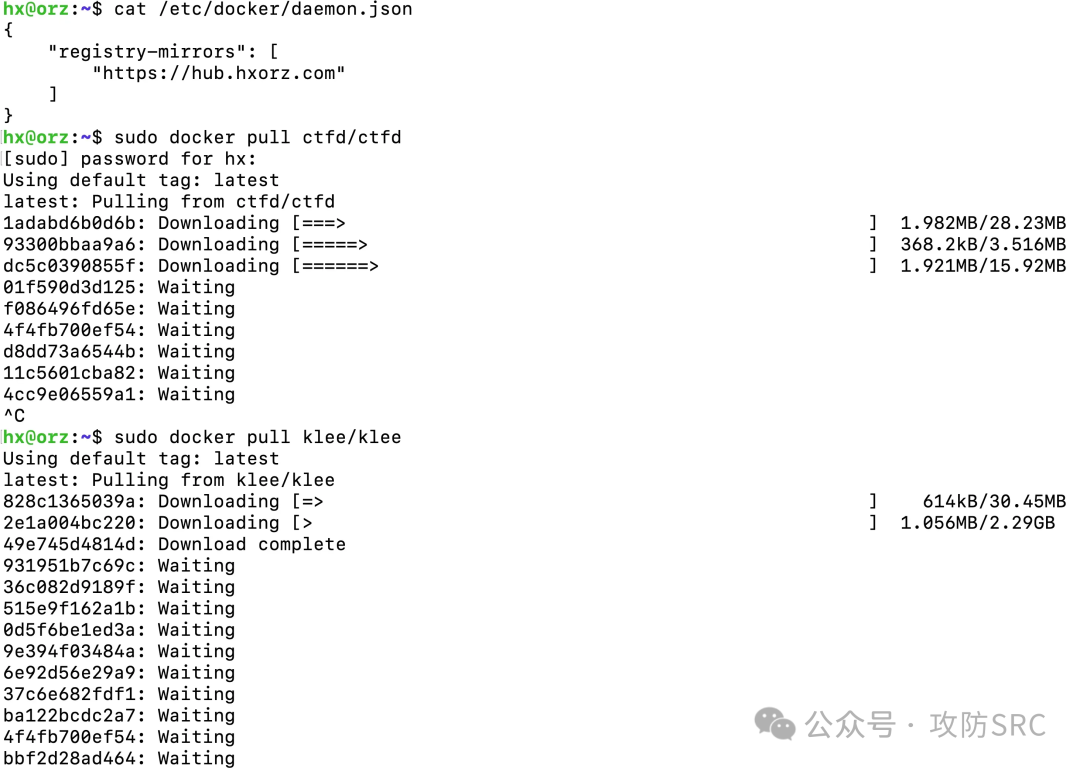
无安全策略,适合服务器随开随用按量计费的,配置完成最有需要在DNS解析上修改域名对应的IP即可
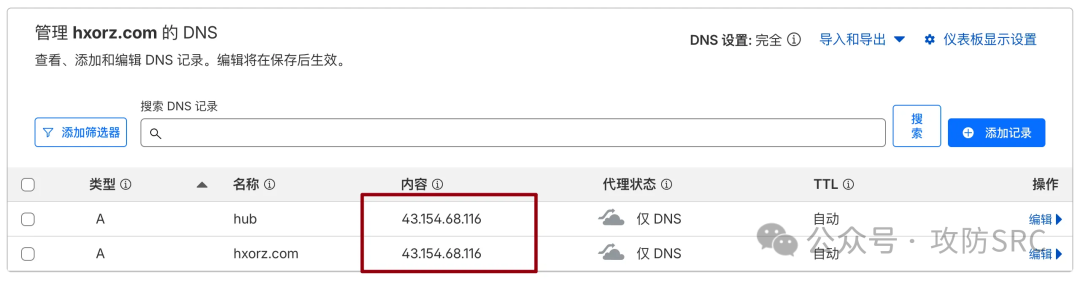
使用方法
将公网服务器的IP在DNS解析上配置好域名之后,只需要更换docker源为自己的源并重载docker服务就能使用了
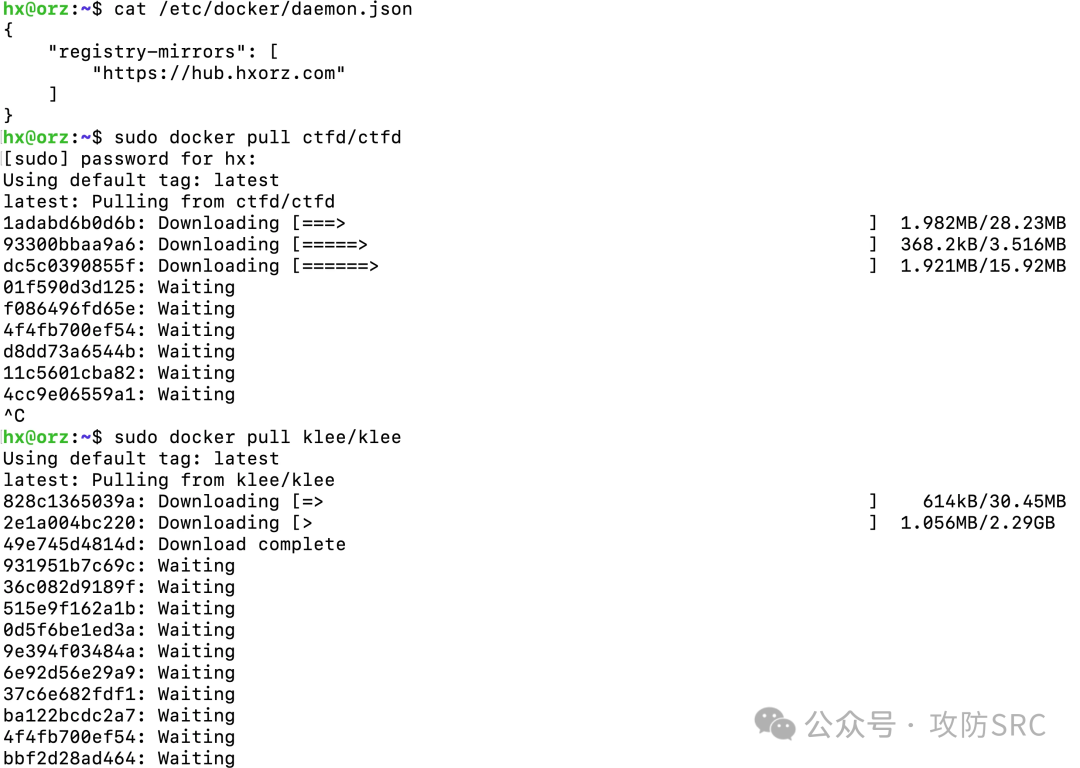
搭建步骤如下:
Step1.开vps,地区优选香港
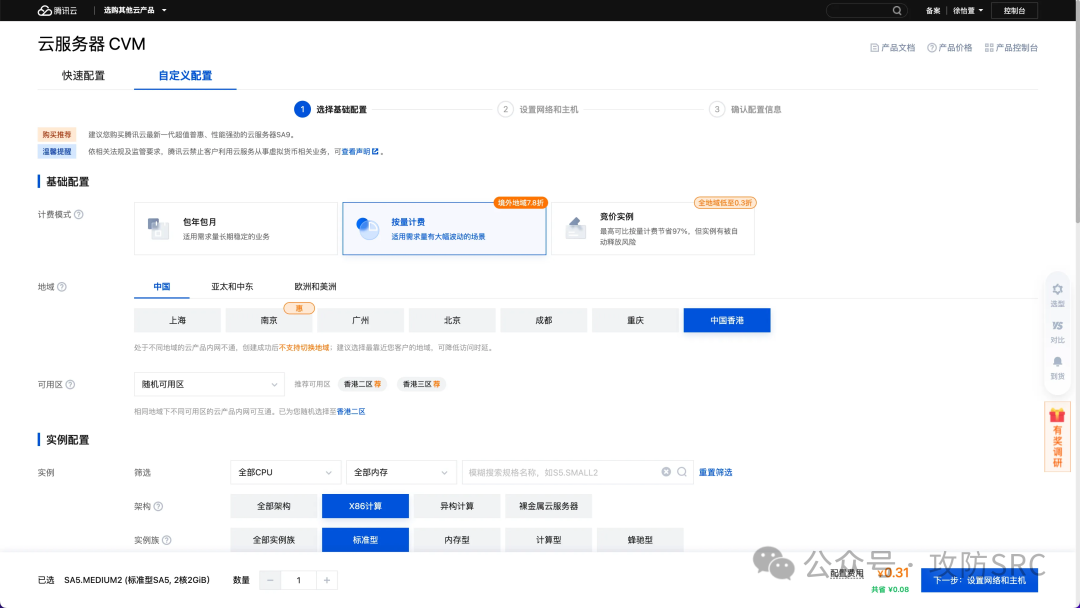
step2.硬件配置2核心2G足够,主要是带宽一定要拉满,操作系统ubuntu24.04
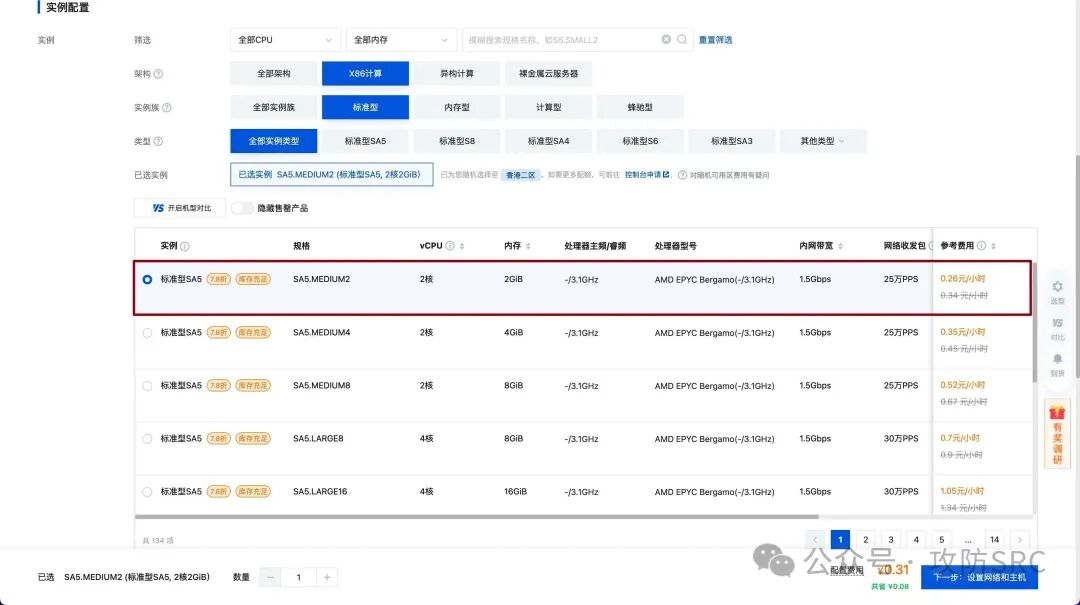
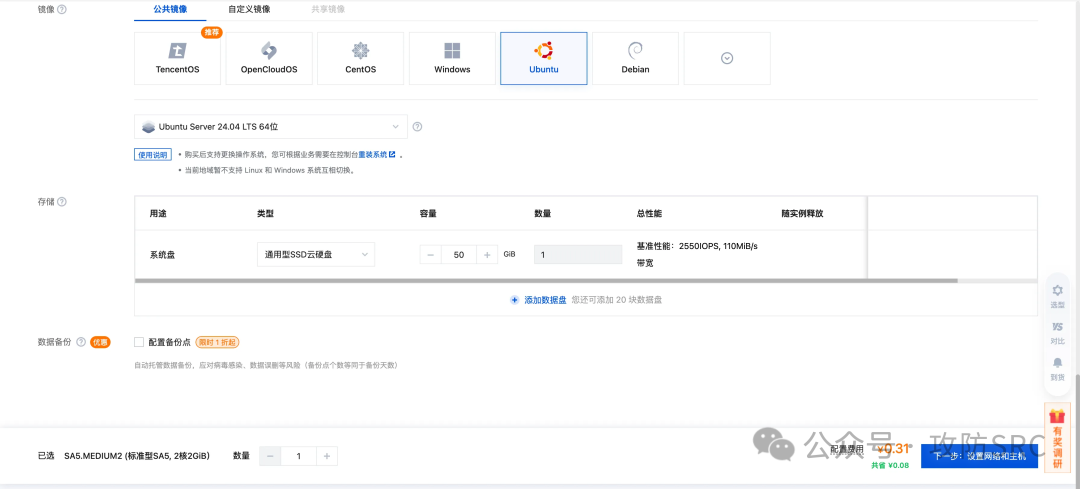
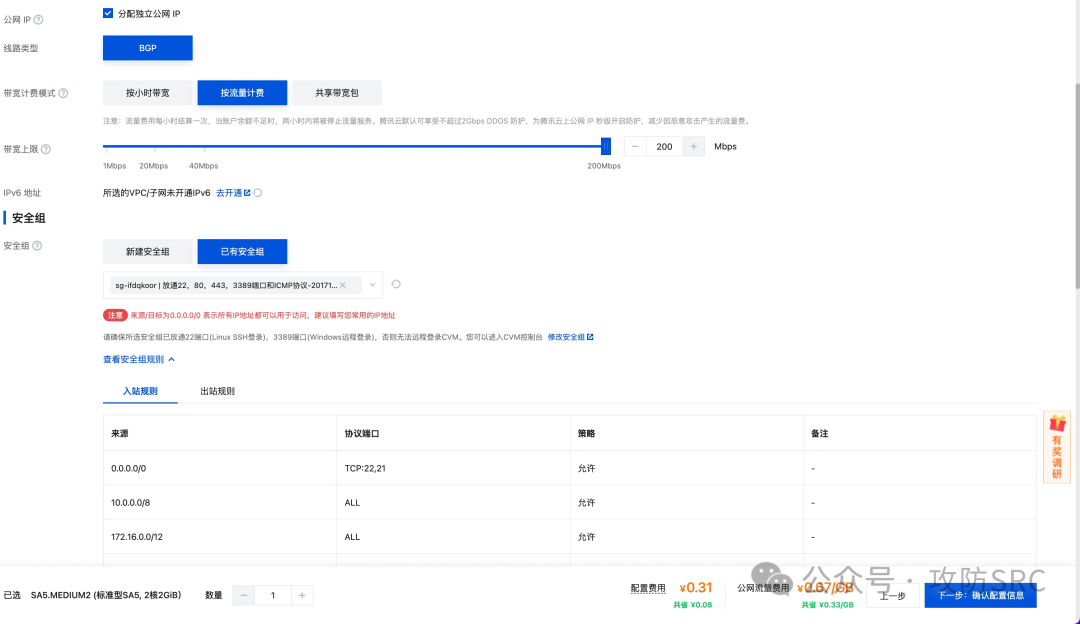
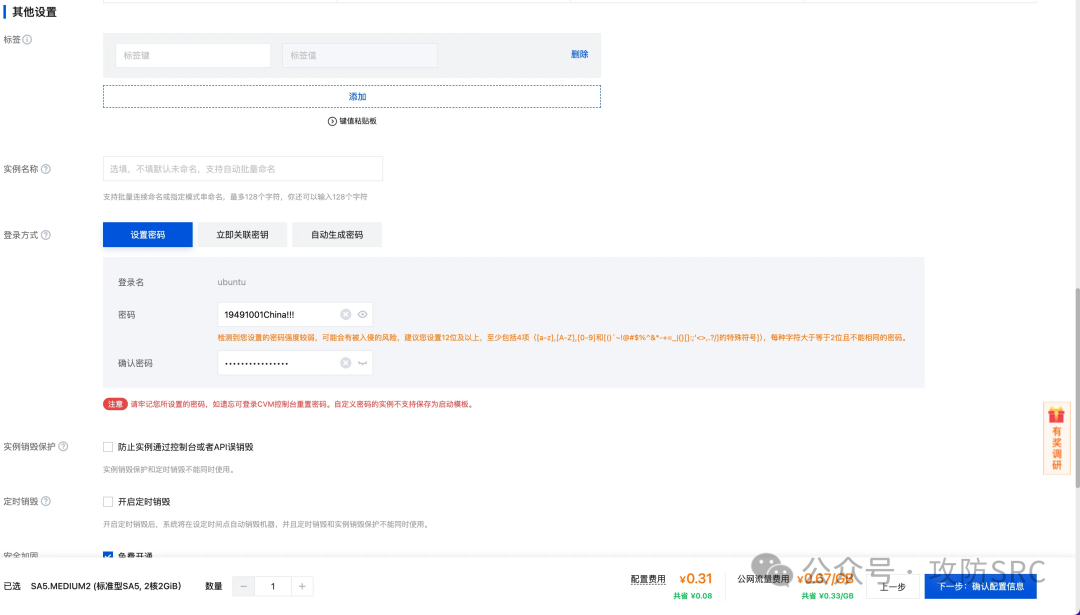
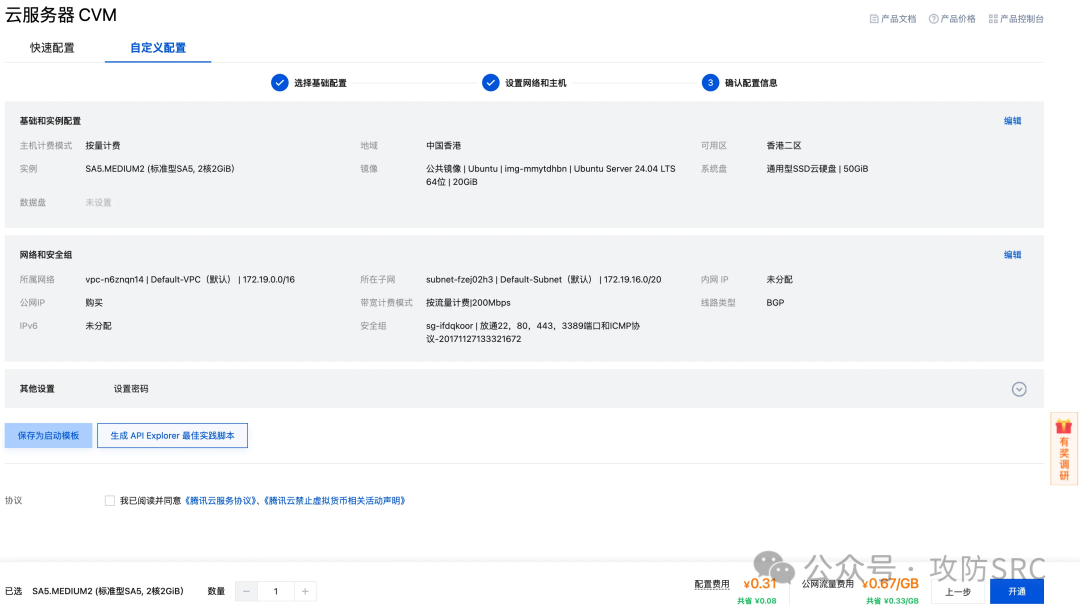
原因:
拉取速度对比:

5Mbps:   500KB/s  →  2GB 镜像需 68 分钟
30Mbps:  3MB/s    →  2GB 镜像需 11 分钟
200Mbps: 20MB/s   →  2GB 镜像需 1.7分钟 ⚡

成本对比(拉 2GB 镜像):
- 流量费: 2GB × ¥0.67 = ¥1.34 (固定)
- 服务器费:
  - 5Mbps:  68分钟 × ¥0.31/60 = ¥0.35
  - 200Mbps: 2分钟 × ¥0.31/60 = ¥0.01

总费用:
  5Mbps:  ¥1.69
  200Mbps: ¥1.35  ← 反而更便宜
反而更省钱(快速完成,早关机)
Step3:开通之后在控制台查看IP,并使用ssh登录进行配置即可
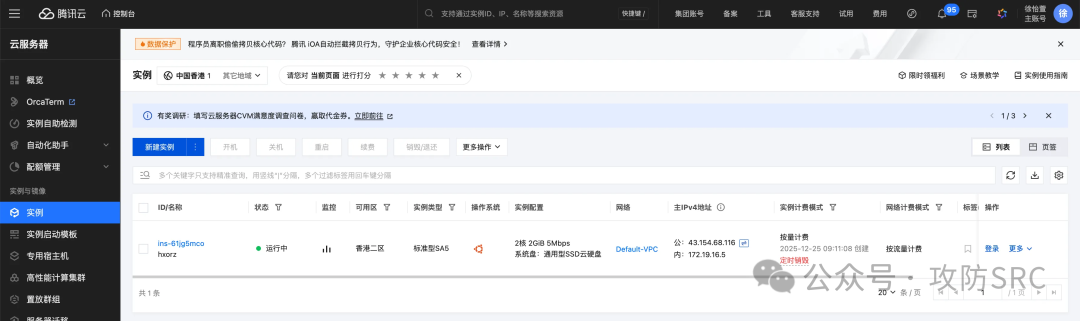
配置脚本代码
使用之前将参数配置里的域名改成自己的域名,在域名解析里需要配置自己购买的临时VPS的IP地址再运行脚本,否则会报错。
#!/usr/bin/env bash
set -euo pipefail

############################
# 参数配置
############################
DOMAIN="hub.hxorz.com"
ALIAS="hxorz.com"
EMAIL="admin@hxorz.com"
SSH_PORT=22

############################
TOTAL_STEPS=13
CURRENT_STEP=0

REG_NAME="dockerhub-registry"
REG_DATA_DIR="/opt/registry/data"
REG_CFG_FILE="/opt/registry/config.yml"
NGX_SITE="/etc/nginx/sites-available/${DOMAIN}"

step() {
  CURRENT_STEP=$((CURRENT_STEP+1))
  echo
  echo "=================================================="
  printf "[步骤 %02d/%02d] %s\n" "$CURRENT_STEP" "$TOTAL_STEPS" "$1"
  echo "--------------------------------------------------"
}

die() { echo "[错误] $*" >&2; exit 1; }

[[ "$(id -u)" -eq 0 ]] || die "请用 sudo bash 运行"

export DEBIAN_FRONTEND=noninteractive

############################
step "显示配置信息"
############################
echo "域名主域   : $DOMAIN"
echo "域名别名   : $ALIAS"
echo "联系邮箱   : $EMAIL"

############################
step "修复 APT 配置(禁用 dep11,解决腾讯云镜像同步问题)"
############################
# 清理旧缓存
rm -rf /var/lib/apt/lists/* || true
apt-get clean || true

# 禁用 dep11 元数据
mkdir -p /etc/apt/apt.conf.d
cat > /etc/apt/apt.conf.d/99no-dep11 <<'EOF'
Acquire::IndexTargets::deb::Contents-deb::Enabled "false";
Acquire::IndexTargets::deb::Contents-udeb::Enabled "false";
Acquire::IndexTargets::deb::Components-amd64::Enabled "false";
Acquire::IndexTargets::deb::Components::Enabled "false";
Acquire::IndexTargets::deb::DEP-11::Enabled "false";
Acquire::IndexTargets::deb::DEP-11-icons-small::Enabled "false";
Acquire::IndexTargets::deb::DEP-11-icons::Enabled "false";
Acquire::IndexTargets::deb::CNF::Enabled "false";
EOF

# 配置 APT 仅使用 gz 压缩,跳过校验失败的文件
cat > /etc/apt/apt.conf.d/99fix-tencent <<'EOF'
Acquire::CompressionTypes::Order "gz";
Acquire::GzipIndexes "true";
Acquire::PDiffs "false";
Acquire::Retries "3";
APT::Get::AllowUnauthenticated "false";
EOF

# 强制更新
echo "执行 APT 更新(可能需要 10-30 秒)..."
apt-get update -o Acquire::CompressionTypes::Order::=gz || {
  echo "首次更新失败,清理后重试..."
  rm -rf /var/lib/apt/lists/*
  apt-get update -o Acquire::CompressionTypes::Order::=gz
}

############################
step "安装基础软件包"
############################
apt-get -y install \
  ca-certificates curl gnupg lsb-release \
  nginx ufw certbot python3-certbot-nginx

############################
step "安装 Docker(使用官方 APT 源)"
############################
if ! command -v docker >/dev/null; then
  install -m 0755 -d /etc/apt/keyrings
  curl -fsSL https://download.docker.com/linux/ubuntu/gpg \
    | gpg --dearmor -o /etc/apt/keyrings/docker.gpg

  CODENAME="$(. /etc/os-release && echo $VERSION_CODENAME)"
  ARCH="$(dpkg --print-architecture)"

  cat > /etc/apt/sources.list.d/docker.list <<EOF
deb [arch=${ARCH} signed-by=/etc/apt/keyrings/docker.gpg] \
https://download.docker.com/linux/ubuntu ${CODENAME} stable
EOF

  apt-get update -o Acquire::CompressionTypes::Order::=gz
  apt-get -y install docker-ce docker-ce-cli containerd.io
fi

systemctl enable --now docker nginx

############################
step "配置防火墙规则"
############################
ufw allow "$SSH_PORT"
ufw allow 80
ufw allow 443
ufw --force enable

############################
step "生成 Registry 配置文件"
############################
mkdir -p "$(dirname "$REG_CFG_FILE")" "$REG_DATA_DIR"
cat > "$REG_CFG_FILE" <<EOF
version: 0.1
storage:
  filesystem:
    rootdirectory: /var/lib/registry
http:
  addr: :5000
proxy:
  remoteurl: https://registry-1.docker.io
EOF

############################
step "启动 Registry 容器"
############################
docker rm -f "$REG_NAME" >/dev/null 2>&1 || true
docker run -d --restart=always \
  --name "$REG_NAME" \
  -p 127.0.0.1:5000:5000 \
  -v "$REG_DATA_DIR:/var/lib/registry" \
  -v "$REG_CFG_FILE:/etc/docker/registry/config.yml:ro" \
  registry:2

echo "等待 Registry 服务启动..."
sleep 3

# 健康检查:等待 Registry 服务就绪
MAX_WAIT=30
for i in $(seq 1 $MAX_WAIT); do
  if curl -fsSI http://127.0.0.1:5000/v2/ >/dev/null 2>&1; then
    echo "Registry 服务已就绪 (耗时 ${i}s)"
    break
  fi
  if [ "$i" -eq "$MAX_WAIT" ]; then
    die "Registry 服务启动超时,请检查容器日志: docker logs $REG_NAME"
  fi
  sleep 1
done

############################
step "配置 Nginx(仅 HTTP,用于 certbot 验证)"
############################
rm -f /etc/nginx/sites-enabled/default
cat > "$NGX_SITE" <<EOF
server {
  listen 80;
  server_name ${DOMAIN} ${ALIAS};

  client_max_body_size 0;

  location /v2/ {
    proxy_pass http://127.0.0.1:5000;
    proxy_set_header Host \$host;
    proxy_set_header X-Real-IP \$remote_addr;
    proxy_set_header X-Forwarded-For \$proxy_add_x_forwarded_for;
    proxy_set_header X-Forwarded-Proto \$scheme;
    proxy_buffering off;
  }

  location / { return 404; }
}
EOF

ln -sf "$NGX_SITE" /etc/nginx/sites-enabled/
nginx -t
systemctl reload nginx

############################
step "申请 TLS 证书(使用 certbot)"
############################
certbot --nginx \
  -d "$DOMAIN" -d "$ALIAS" \
  --non-interactive --agree-tos -m "$EMAIL"

############################
step "配置 Nginx HTTPS 反向代理"
############################
cat > "$NGX_SITE" <<EOF
server {
  listen 80;
  server_name ${DOMAIN} ${ALIAS};
  return 301 https://\$host\$request_uri;
}

server {
  listen 443 ssl http2;
  server_name ${DOMAIN} ${ALIAS};

  ssl_certificate     /etc/letsencrypt/live/${DOMAIN}/fullchain.pem;
  ssl_certificate_key /etc/letsencrypt/live/${DOMAIN}/privkey.pem;

  client_max_body_size 0;

  location /v2/ {
    proxy_pass http://127.0.0.1:5000;
    proxy_set_header Host \$host;
    proxy_set_header X-Real-IP \$remote_addr;
    proxy_set_header X-Forwarded-For \$proxy_add_x_forwarded_for;
    proxy_set_header X-Forwarded-Proto \$scheme;
    proxy_buffering off;
    proxy_request_buffering off;
    proxy_read_timeout 900;
    proxy_send_timeout 900;
  }

  location / { return 404; }
}
EOF

nginx -t
systemctl reload nginx

############################
step "配置 Docker 镜像加速"
############################
mkdir -p /etc/docker
cat > /etc/docker/daemon.json <<EOF
{
  "registry-mirrors": ["https://${DOMAIN}"]
}
EOF

systemctl daemon-reload
systemctl restart docker

# 重启后等待 Docker 服务就绪
sleep 3

############################
step "最终验证"
############################
echo "检查 Registry 容器状态:"
docker ps | grep "$REG_NAME"

echo
echo "测试 HTTPS 端点(带重试机制):"
for i in {1..5}; do
  if curl -fsSI "https://${DOMAIN}/v2/" 2>&1 | head -n 10; then
    echo "HTTPS 端点验证成功"
    break
  fi
  echo "第 $i 次尝试失败,等待 2 秒后重试..."
  sleep 2
done

echo
echo "测试镜像拉取:"
docker pull busybox:latest

echo
echo "=================================================="
echo "[完成] Docker Hub 镜像代理部署成功"
echo "=================================================="
echo "使用方式:"
echo "  docker pull klee/klee"
echo "  (将自动通过 https://${DOMAIN} 代理)"
echo "=================================================="
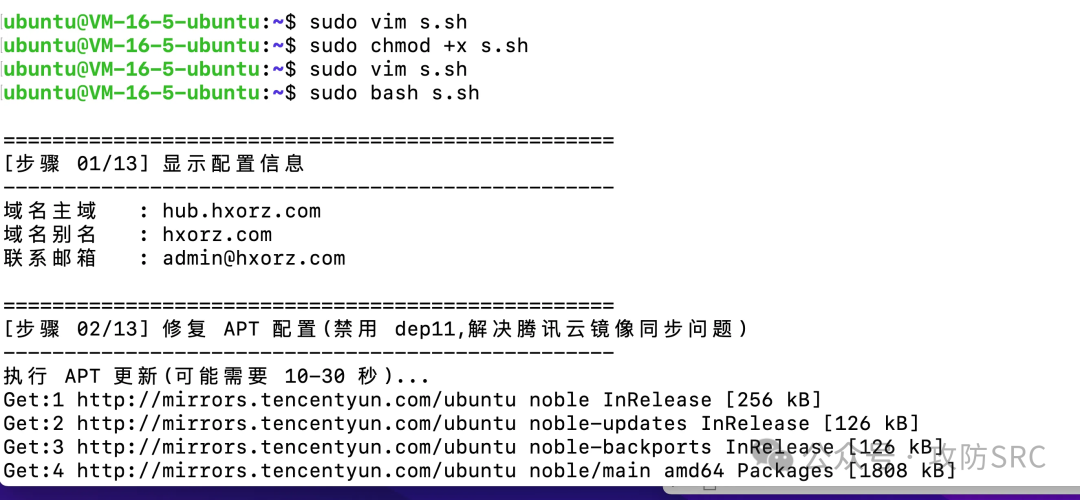
运行命令
ubuntu@VM-16-5-ubuntu:~$ sudo vim s.sh
ubuntu@VM-16-5-ubuntu:~$ sudo chmod +x s.sh
ubuntu@VM-16-5-ubuntu:~$ sudo vim s.sh
ubuntu@VM-16-5-ubuntu:~$ sudo bash s.sh
附录:安装日志
~ ⌚ 10:36:28
$ ssh ubuntu@43.154.68.116
The authenticity of host '43.154.68.116 (43.154.68.116)' can't be established.
ED25519 key fingerprint is SHA256:Hm1OT+3pWkZxfLE/UqUCR+3yWbHigbldxvenWwJqtPk.
This key is not known by any other names.
Are you sure you want to continue connecting (yes/no/[fingerprint])? yes
Warning: Permanently added '43.154.68.116' (ED25519) to the list of known hosts.
ubuntu@43.154.68.116's password:
Welcome to Ubuntu 24.04 LTS (GNU/Linux 6.8.0-71-generic x86_64)

 * Documentation:  https://help.ubuntu.com
 * Management:     https://landscape.canonical.com
 * Support:        https://ubuntu.com/pro

 System information as of Thu Dec 25 10:36:41 AM CST 2025

  System load:  0.14               Processes:             120
  Usage of /:   10.1% of 49.10GB   Users logged in:       0
  Memory usage: 15%                IPv4 address for eth0: 172.19.16.5
  Swap usage:   0%


Expanded Security Maintenance for Applications is not enabled.

255 updates can be applied immediately.
To see these additional updates run: apt list --upgradable

Enable ESM Apps to receive additional future security updates.
See https://ubuntu.com/esm or run: sudo pro status


The list of available updates is more than a week old.
To check for new updates run: sudo apt update


The programs included with the Ubuntu system are free software;
the exact distribution terms for each program are described in the
individual files in /usr/share/doc/*/copyright.

Ubuntu comes with ABSOLUTELY NO WARRANTY, to the extent permitted by
applicable law.

To run a command as administrator (user "root"), use "sudo <command>".
See "man sudo_root" for details.

ubuntu@VM-16-5-ubuntu:~$ sudo vim s.sh
ubuntu@VM-16-5-ubuntu:~$ sudo chmod +x s.sh
ubuntu@VM-16-5-ubuntu:~$ sudo vim s.sh
ubuntu@VM-16-5-ubuntu:~$ sudo bash s.sh

==================================================
[步骤 01/13] 显示配置信息
--------------------------------------------------
域名主域   : hub.hxorz.com
域名别名   : hxorz.com
联系邮箱   : admin@hxorz.com

==================================================
[步骤 02/13] 修复 APT 配置(禁用 dep11,解决腾讯云镜像同步问题)
--------------------------------------------------
执行 APT 更新(可能需要 10-30 秒)...
Get:1 http://mirrors.tencentyun.com/ubuntu noble InRelease [256 kB]
Get:2 http://mirrors.tencentyun.com/ubuntu noble-updates InRelease [126 kB]
Get:3 http://mirrors.tencentyun.com/ubuntu noble-backports InRelease [126 kB]
Get:4 http://mirrors.tencentyun.com/ubuntu noble/main amd64 Packages [1808 kB]
Get:5 http://mirrors.tencentyun.com/ubuntu noble/main Translation-en [721 kB]
Get:6 http://mirrors.tencentyun.com/ubuntu noble/main amd64 Components [665 kB]
Get:7 http://mirrors.tencentyun.com/ubuntu noble/main amd64 c-n-f Metadata [30.5 kB]
Get:8 http://mirrors.tencentyun.com/ubuntu noble/restricted amd64 Packages [117 kB]
Get:9 http://mirrors.tencentyun.com/ubuntu noble/restricted Translation-en [22.4 kB]
Get:10 http://mirrors.tencentyun.com/ubuntu noble/restricted amd64 c-n-f Metadata [416 B]
Get:11 http://mirrors.tencentyun.com/ubuntu noble/universe amd64 Packages [19.3 MB]
Get:12 http://mirrors.tencentyun.com/ubuntu noble/universe Translation-en [8425 kB]
Get:13 http://mirrors.tencentyun.com/ubuntu noble/universe amd64 Components [5943 kB]
Get:14 http://mirrors.tencentyun.com/ubuntu noble/universe amd64 c-n-f Metadata [301 kB]
Get:15 http://mirrors.tencentyun.com/ubuntu noble/multiverse amd64 Packages [331 kB]
Get:16 http://mirrors.tencentyun.com/ubuntu noble/multiverse Translation-en [150 kB]
Get:17 http://mirrors.tencentyun.com/ubuntu noble/multiverse amd64 Components [41.9 kB]
Get:18 http://mirrors.tencentyun.com/ubuntu noble/multiverse amd64 c-n-f Metadata [8328 B]
Get:19 http://mirrors.tencentyun.com/ubuntu noble-updates/main amd64 Packages [2130 kB]
Get:20 http://mirrors.tencentyun.com/ubuntu noble-updates/main Translation-en [459 kB]
Get:21 http://mirrors.tencentyun.com/ubuntu noble-updates/main amd64 Components [235 kB]
Get:22 http://mirrors.tencentyun.com/ubuntu noble-updates/main amd64 c-n-f Metadata [15.8 kB]
Get:23 http://mirrors.tencentyun.com/ubuntu noble-updates/restricted amd64 Packages [3059 kB]
Get:24 http://mirrors.tencentyun.com/ubuntu noble-updates/restricted Translation-en [685 kB]
Get:25 http://mirrors.tencentyun.com/ubuntu noble-updates/restricted amd64 Components [159 B]
Get:26 http://mirrors.tencentyun.com/ubuntu noble-updates/restricted amd64 c-n-f Metadata [516 B]
Get:27 http://mirrors.tencentyun.com/ubuntu noble-updates/universe amd64 Packages [1950 kB]
Get:28 http://mirrors.tencentyun.com/ubuntu noble-updates/universe Translation-en [434 kB]
Get:29 http://mirrors.tencentyun.com/ubuntu noble-updates/universe amd64 Components [520 kB]
Get:30 http://mirrors.tencentyun.com/ubuntu noble-updates/universe amd64 c-n-f Metadata [31.4 kB]
Get:31 http://mirrors.tencentyun.com/ubuntu noble-updates/multiverse amd64 Packages [35.9 kB]
Get:32 http://mirrors.tencentyun.com/ubuntu noble-updates/multiverse Translation-en [6643 B]
Get:33 http://mirrors.tencentyun.com/ubuntu noble-updates/multiverse amd64 Components [888 B]
Get:34 http://mirrors.tencentyun.com/ubuntu noble-updates/multiverse amd64 c-n-f Metadata [488 B]
Get:35 http://mirrors.tencentyun.com/ubuntu noble-backports/main amd64 Packages [49.5 kB]
Get:36 http://mirrors.tencentyun.com/ubuntu noble-backports/main Translation-en [10.6 kB]
Get:37 http://mirrors.tencentyun.com/ubuntu noble-backports/main amd64 Components [8112 B]
Get:38 http://mirrors.tencentyun.com/ubuntu noble-backports/main amd64 c-n-f Metadata [368 B]
Get:39 http://mirrors.tencentyun.com/ubuntu noble-backports/restricted amd64 Components [160 B]
Get:40 http://mirrors.tencentyun.com/ubuntu noble-backports/restricted amd64 c-n-f Metadata [116 B]
Get:41 http://mirrors.tencentyun.com/ubuntu noble-backports/universe amd64 Packages [34.6 kB]
Get:42 http://mirrors.tencentyun.com/ubuntu noble-backports/universe Translation-en [19.4 kB]
Get:43 http://mirrors.tencentyun.com/ubuntu noble-backports/universe amd64 Components [11.3 kB]
Get:44 http://mirrors.tencentyun.com/ubuntu noble-backports/universe amd64 c-n-f Metadata [1444 B]
Get:45 http://mirrors.tencentyun.com/ubuntu noble-backports/multiverse amd64 Components [161 B]
Get:46 http://mirrors.tencentyun.com/ubuntu noble-backports/multiverse amd64 c-n-f Metadata [116 B]
Fetched 48.1 MB in 6s (8684 kB/s)
Reading package lists... Done

==================================================
[步骤 03/13] 安装基础软件包
--------------------------------------------------
Reading package lists... Done
Building dependency tree... Done
Reading state information... Done
ca-certificates is already the newest version (20240203).
ca-certificates set to manually installed.
curl is already the newest version (8.5.0-2ubuntu10.6).
lsb-release is already the newest version (12.0-2).
lsb-release set to manually installed.
ufw is already the newest version (0.36.2-6).
ufw set to manually installed.
The following packages were automatically installed and are no longer required:
  eatmydata libeatmydata1 python3-json-pointer python3-jsonpatch python3-jsonschema python3-pyrsistent
Use 'sudo apt autoremove' to remove them.
The following additional packages will be installed:
  dirmngr gnupg-l10n gnupg-utils gpg gpg-agent gpg-wks-client gpgconf gpgsm gpgv keyboxd nginx-common python3-acme
  python3-certbot python3-configargparse python3-icu python3-josepy python3-parsedatetime python3-rfc3339
Suggested packages:
  python-certbot-doc python3-certbot-apache pinentry-gnome3 tor parcimonie xloadimage gpg-wks-server scdaemon
  fcgiwrap nginx-doc ssl-cert python-acme-doc python-certbot-nginx-doc
The following NEW packages will be installed:
  certbot nginx nginx-common python3-acme python3-certbot python3-certbot-nginx python3-configargparse python3-icu
  python3-josepy python3-parsedatetime python3-rfc3339
The following packages will be upgraded:
  dirmngr gnupg gnupg-l10n gnupg-utils gpg gpg-agent gpg-wks-client gpgconf gpgsm gpgv keyboxd
11 upgraded, 11 newly installed, 0 to remove and 256 not upgraded.
Need to get 3953 kB of archives.
After this operation, 7295 kB of additional disk space will be used.
Get:1 http://mirrors.tencentyun.com/ubuntu noble-updates/main amd64 gpg-wks-client amd64 2.4.4-2ubuntu17.3 [70.9 kB]
Get:2 http://mirrors.tencentyun.com/ubuntu noble-updates/main amd64 dirmngr amd64 2.4.4-2ubuntu17.3 [323 kB]
Get:3 http://mirrors.tencentyun.com/ubuntu noble-updates/main amd64 gnupg-utils amd64 2.4.4-2ubuntu17.3 [109 kB]
Get:4 http://mirrors.tencentyun.com/ubuntu noble-updates/main amd64 gpgsm amd64 2.4.4-2ubuntu17.3 [232 kB]
Get:5 http://mirrors.tencentyun.com/ubuntu noble-updates/main amd64 gpg-agent amd64 2.4.4-2ubuntu17.3 [227 kB]
Get:6 http://mirrors.tencentyun.com/ubuntu noble-updates/main amd64 gpg amd64 2.4.4-2ubuntu17.3 [565 kB]
Get:7 http://mirrors.tencentyun.com/ubuntu noble-updates/main amd64 gpgconf amd64 2.4.4-2ubuntu17.3 [104 kB]
Get:8 http://mirrors.tencentyun.com/ubuntu noble-updates/main amd64 gnupg all 2.4.4-2ubuntu17.3 [359 kB]
Get:9 http://mirrors.tencentyun.com/ubuntu noble-updates/main amd64 keyboxd amd64 2.4.4-2ubuntu17.3 [78.3 kB]
Get:10 http://mirrors.tencentyun.com/ubuntu noble-updates/main amd64 gpgv amd64 2.4.4-2ubuntu17.3 [158 kB]
Get:11 http://mirrors.tencentyun.com/ubuntu noble-updates/main amd64 gnupg-l10n all 2.4.4-2ubuntu17.3 [66.4 kB]
Get:12 http://mirrors.tencentyun.com/ubuntu noble-updates/main amd64 nginx-common all 1.24.0-2ubuntu7.5 [43.4 kB]
Get:13 http://mirrors.tencentyun.com/ubuntu noble-updates/main amd64 nginx amd64 1.24.0-2ubuntu7.5 [520 kB]
Get:14 http://mirrors.tencentyun.com/ubuntu noble/universe amd64 python3-josepy all 1.14.0-1 [22.1 kB]
Get:15 http://mirrors.tencentyun.com/ubuntu noble/universe amd64 python3-rfc3339 all 1.1-4 [6744 B]
Get:16 http://mirrors.tencentyun.com/ubuntu noble/universe amd64 python3-acme all 2.9.0-1 [48.5 kB]
Get:17 http://mirrors.tencentyun.com/ubuntu noble/universe amd64 python3-configargparse all 1.7-1 [31.7 kB]
Get:18 http://mirrors.tencentyun.com/ubuntu noble/universe amd64 python3-parsedatetime all 2.6-3 [32.8 kB]
Get:19 http://mirrors.tencentyun.com/ubuntu noble/universe amd64 python3-certbot all 2.9.0-1 [267 kB]
Get:20 http://mirrors.tencentyun.com/ubuntu noble/universe amd64 certbot all 2.9.0-1 [89.2 kB]
Get:21 http://mirrors.tencentyun.com/ubuntu noble/universe amd64 python3-certbot-nginx all 2.9.0-1 [66.0 kB]
Get:22 http://mirrors.tencentyun.com/ubuntu noble/main amd64 python3-icu amd64 2.12-1build2 [534 kB]
Fetched 3953 kB in 0s (54.5 MB/s)
Preconfiguring packages ...
(Reading database ... 85502 files and directories currently installed.)
Preparing to unpack .../0-gpg-wks-client_2.4.4-2ubuntu17.3_amd64.deb ...
Unpacking gpg-wks-client (2.4.4-2ubuntu17.3) over (2.4.4-2ubuntu17) ...
Preparing to unpack .../1-dirmngr_2.4.4-2ubuntu17.3_amd64.deb ...
Unpacking dirmngr (2.4.4-2ubuntu17.3) over (2.4.4-2ubuntu17) ...
Preparing to unpack .../2-gnupg-utils_2.4.4-2ubuntu17.3_amd64.deb ...
Unpacking gnupg-utils (2.4.4-2ubuntu17.3) over (2.4.4-2ubuntu17) ...
Preparing to unpack .../3-gpgsm_2.4.4-2ubuntu17.3_amd64.deb ...
Unpacking gpgsm (2.4.4-2ubuntu17.3) over (2.4.4-2ubuntu17) ...
Preparing to unpack .../4-gpg-agent_2.4.4-2ubuntu17.3_amd64.deb ...
Unpacking gpg-agent (2.4.4-2ubuntu17.3) over (2.4.4-2ubuntu17) ...
Preparing to unpack .../5-gpg_2.4.4-2ubuntu17.3_amd64.deb ...
Unpacking gpg (2.4.4-2ubuntu17.3) over (2.4.4-2ubuntu17) ...
Preparing to unpack .../6-gpgconf_2.4.4-2ubuntu17.3_amd64.deb ...
Unpacking gpgconf (2.4.4-2ubuntu17.3) over (2.4.4-2ubuntu17) ...
Preparing to unpack .../7-gnupg_2.4.4-2ubuntu17.3_all.deb ...
Unpacking gnupg (2.4.4-2ubuntu17.3) over (2.4.4-2ubuntu17) ...
Preparing to unpack .../8-keyboxd_2.4.4-2ubuntu17.3_amd64.deb ...
Unpacking keyboxd (2.4.4-2ubuntu17.3) over (2.4.4-2ubuntu17) ...
Preparing to unpack .../9-gpgv_2.4.4-2ubuntu17.3_amd64.deb ...
Unpacking gpgv (2.4.4-2ubuntu17.3) over (2.4.4-2ubuntu17) ...
Setting up gpgv (2.4.4-2ubuntu17.3) ...
(Reading database ... 85502 files and directories currently installed.)
Preparing to unpack .../00-gnupg-l10n_2.4.4-2ubuntu17.3_all.deb ...
Unpacking gnupg-l10n (2.4.4-2ubuntu17.3) over (2.4.4-2ubuntu17) ...
Selecting previously unselected package nginx-common.
Preparing to unpack .../01-nginx-common_1.24.0-2ubuntu7.5_all.deb ...
Unpacking nginx-common (1.24.0-2ubuntu7.5) ...
Selecting previously unselected package nginx.
Preparing to unpack .../02-nginx_1.24.0-2ubuntu7.5_amd64.deb ...
Unpacking nginx (1.24.0-2ubuntu7.5) ...
Selecting previously unselected package python3-josepy.
Preparing to unpack .../03-python3-josepy_1.14.0-1_all.deb ...
Unpacking python3-josepy (1.14.0-1) ...
Selecting previously unselected package python3-rfc3339.
Preparing to unpack .../04-python3-rfc3339_1.1-4_all.deb ...
Unpacking python3-rfc3339 (1.1-4) ...
Selecting previously unselected package python3-acme.
Preparing to unpack .../05-python3-acme_2.9.0-1_all.deb ...
Unpacking python3-acme (2.9.0-1) ...
Selecting previously unselected package python3-configargparse.
Preparing to unpack .../06-python3-configargparse_1.7-1_all.deb ...
Unpacking python3-configargparse (1.7-1) ...
Selecting previously unselected package python3-parsedatetime.
Preparing to unpack .../07-python3-parsedatetime_2.6-3_all.deb ...
Unpacking python3-parsedatetime (2.6-3) ...
Selecting previously unselected package python3-certbot.
Preparing to unpack .../08-python3-certbot_2.9.0-1_all.deb ...
Unpacking python3-certbot (2.9.0-1) ...
Selecting previously unselected package certbot.
Preparing to unpack .../09-certbot_2.9.0-1_all.deb ...
Unpacking certbot (2.9.0-1) ...
Selecting previously unselected package python3-certbot-nginx.
Preparing to unpack .../10-python3-certbot-nginx_2.9.0-1_all.deb ...
Unpacking python3-certbot-nginx (2.9.0-1) ...
Selecting previously unselected package python3-icu.
Preparing to unpack .../11-python3-icu_2.12-1build2_amd64.deb ...
Unpacking python3-icu (2.12-1build2) ...
Setting up python3-configargparse (1.7-1) ...
Setting up python3-parsedatetime (2.6-3) ...
Setting up python3-icu (2.12-1build2) ...
Setting up nginx-common (1.24.0-2ubuntu7.5) ...
Created symlink /etc/systemd/system/multi-user.target.wants/nginx.service → /usr/lib/systemd/system/nginx.service.
Setting up gnupg-l10n (2.4.4-2ubuntu17.3) ...
Setting up python3-josepy (1.14.0-1) ...
Setting up gpgconf (2.4.4-2ubuntu17.3) ...
Setting up python3-rfc3339 (1.1-4) ...
Setting up gpg (2.4.4-2ubuntu17.3) ...
Setting up gnupg-utils (2.4.4-2ubuntu17.3) ...
Setting up gpg-agent (2.4.4-2ubuntu17.3) ...
Setting up nginx (1.24.0-2ubuntu7.5) ...
 * Upgrading binary nginx                                                                                      [ OK ]
Setting up gpgsm (2.4.4-2ubuntu17.3) ...
Setting up dirmngr (2.4.4-2ubuntu17.3) ...
Setting up python3-acme (2.9.0-1) ...
Setting up keyboxd (2.4.4-2ubuntu17.3) ...
Setting up python3-certbot (2.9.0-1) ...
Setting up certbot (2.9.0-1) ...
Created symlink /etc/systemd/system/timers.target.wants/certbot.timer → /usr/lib/systemd/system/certbot.timer.
Setting up gnupg (2.4.4-2ubuntu17.3) ...
Setting up gpg-wks-client (2.4.4-2ubuntu17.3) ...
Setting up python3-certbot-nginx (2.9.0-1) ...
Processing triggers for man-db (2.12.0-4build2) ...
Processing triggers for install-info (7.1-3build2) ...
Processing triggers for ufw (0.36.2-6) ...
Scanning processes...
Scanning linux images...

Running kernel seems to be up-to-date.

No services need to be restarted.

No containers need to be restarted.

No user sessions are running outdated binaries.

No VM guests are running outdated hypervisor (qemu) binaries on this host.

==================================================
[步骤 04/13] 安装 Docker(使用官方 APT 源)
--------------------------------------------------
Hit:1 http://mirrors.tencentyun.com/ubuntu noble InRelease
Hit:2 http://mirrors.tencentyun.com/ubuntu noble-updates InRelease
Hit:3 http://mirrors.tencentyun.com/ubuntu noble-backports InRelease
Get:4 https://download.docker.com/linux/ubuntu noble InRelease [48.5 kB]
Get:5 https://download.docker.com/linux/ubuntu noble/stable amd64 Packages [49.1 kB]
Fetched 97.6 kB in 0s (424 kB/s)
Reading package lists... Done
Reading package lists... Done
Building dependency tree... Done
Reading state information... Done
The following packages were automatically installed and are no longer required:
  eatmydata libeatmydata1 python3-json-pointer python3-jsonpatch python3-jsonschema python3-pyrsistent
Use 'sudo apt autoremove' to remove them.
The following additional packages will be installed:
  docker-buildx-plugin docker-ce-rootless-extras docker-compose-plugin libslirp0 pigz slirp4netns
Suggested packages:
  cgroupfs-mount | cgroup-lite docker-model-plugin
The following NEW packages will be installed:
  containerd.io docker-buildx-plugin docker-ce docker-ce-cli docker-ce-rootless-extras docker-compose-plugin
  libslirp0 pigz slirp4netns
0 upgraded, 9 newly installed, 0 to remove and 256 not upgraded.
Need to get 91.3 MB of archives.
After this operation, 364 MB of additional disk space will be used.
Get:1 https://download.docker.com/linux/ubuntu noble/stable amd64 containerd.io amd64 2.2.1-1~ubuntu.24.04~noble [23.4 MB]
Get:2 http://mirrors.tencentyun.com/ubuntu noble/universe amd64 pigz amd64 2.8-1 [65.6 kB]
Get:3 http://mirrors.tencentyun.com/ubuntu noble/main amd64 libslirp0 amd64 4.7.0-1ubuntu3 [63.8 kB]
Get:4 http://mirrors.tencentyun.com/ubuntu noble/universe amd64 slirp4netns amd64 1.2.1-1build2 [34.9 kB]
Get:5 https://download.docker.com/linux/ubuntu noble/stable amd64 docker-ce-cli amd64 5:29.1.3-1~ubuntu.24.04~noble [16.3 MB]
Get:6 https://download.docker.com/linux/ubuntu noble/stable amd64 docker-ce amd64 5:29.1.3-1~ubuntu.24.04~noble [21.0 MB]
Get:7 https://download.docker.com/linux/ubuntu noble/stable amd64 docker-buildx-plugin amd64 0.30.1-1~ubuntu.24.04~noble [16.4 MB]
Get:8 https://download.docker.com/linux/ubuntu noble/stable amd64 docker-ce-rootless-extras amd64 5:29.1.3-1~ubuntu.24.04~noble [6383 kB]
Get:9 https://download.docker.com/linux/ubuntu noble/stable amd64 docker-compose-plugin amd64 5.0.0-1~ubuntu.24.04~noble [7709 kB]
Fetched 91.3 MB in 7s (13.5 MB/s)
Selecting previously unselected package containerd.io.
(Reading database ... 85947 files and directories currently installed.)
Preparing to unpack .../0-containerd.io_2.2.1-1~ubuntu.24.04~noble_amd64.deb ...
Unpacking containerd.io (2.2.1-1~ubuntu.24.04~noble) ...
Selecting previously unselected package docker-ce-cli.
Preparing to unpack .../1-docker-ce-cli_5%3a29.1.3-1~ubuntu.24.04~noble_amd64.deb ...
Unpacking docker-ce-cli (5:29.1.3-1~ubuntu.24.04~noble) ...
Selecting previously unselected package docker-ce.
Preparing to unpack .../2-docker-ce_5%3a29.1.3-1~ubuntu.24.04~noble_amd64.deb ...
Unpacking docker-ce (5:29.1.3-1~ubuntu.24.04~noble) ...
Selecting previously unselected package pigz.
Preparing to unpack .../3-pigz_2.8-1_amd64.deb ...
Unpacking pigz (2.8-1) ...
Selecting previously unselected package docker-buildx-plugin.
Preparing to unpack .../4-docker-buildx-plugin_0.30.1-1~ubuntu.24.04~noble_amd64.deb ...
Unpacking docker-buildx-plugin (0.30.1-1~ubuntu.24.04~noble) ...
Selecting previously unselected package docker-ce-rootless-extras.
Preparing to unpack .../5-docker-ce-rootless-extras_5%3a29.1.3-1~ubuntu.24.04~noble_amd64.deb ...
Unpacking docker-ce-rootless-extras (5:29.1.3-1~ubuntu.24.04~noble) ...
Selecting previously unselected package docker-compose-plugin.
Preparing to unpack .../6-docker-compose-plugin_5.0.0-1~ubuntu.24.04~noble_amd64.deb ...
Unpacking docker-compose-plugin (5.0.0-1~ubuntu.24.04~noble) ...
Selecting previously unselected package libslirp0:amd64.
Preparing to unpack .../7-libslirp0_4.7.0-1ubuntu3_amd64.deb ...
Unpacking libslirp0:amd64 (4.7.0-1ubuntu3) ...
Selecting previously unselected package slirp4netns.
Preparing to unpack .../8-slirp4netns_1.2.1-1build2_amd64.deb ...
Unpacking slirp4netns (1.2.1-1build2) ...
Setting up docker-buildx-plugin (0.30.1-1~ubuntu.24.04~noble) ...
Setting up containerd.io (2.2.1-1~ubuntu.24.04~noble) ...
Created symlink /etc/systemd/system/multi-user.target.wants/containerd.service → /usr/lib/systemd/system/containerd.service.
Setting up docker-compose-plugin (5.0.0-1~ubuntu.24.04~noble) ...
Setting up docker-ce-cli (5:29.1.3-1~ubuntu.24.04~noble) ...
Setting up libslirp0:amd64 (4.7.0-1ubuntu3) ...
Setting up pigz (2.8-1) ...
Setting up docker-ce-rootless-extras (5:29.1.3-1~ubuntu.24.04~noble) ...
Setting up slirp4netns (1.2.1-1build2) ...
Setting up docker-ce (5:29.1.3-1~ubuntu.24.04~noble) ...
Created symlink /etc/systemd/system/multi-user.target.wants/docker.service → /usr/lib/systemd/system/docker.service.
Created symlink /etc/systemd/system/sockets.target.wants/docker.socket → /usr/lib/systemd/system/docker.socket.
Processing triggers for man-db (2.12.0-4build2) ...
Processing triggers for libc-bin (2.39-0ubuntu8.6) ...
Scanning processes...
Scanning linux images...

Running kernel seems to be up-to-date.

No services need to be restarted.

No containers need to be restarted.

No user sessions are running outdated binaries.

No VM guests are running outdated hypervisor (qemu) binaries on this host.
Synchronizing state of docker.service with SysV service script with /usr/lib/systemd/systemd-sysv-install.
Executing: /usr/lib/systemd/systemd-sysv-install enable docker
Synchronizing state of nginx.service with SysV service script with /usr/lib/systemd/systemd-sysv-install.
Executing: /usr/lib/systemd/systemd-sysv-install enable nginx

==================================================
[步骤 05/13] 配置防火墙规则
--------------------------------------------------
Rules updated
Rules updated (v6)
Rules updated
Rules updated (v6)
Rules updated
Rules updated (v6)
Firewall is active and enabled on system startup

==================================================
[步骤 06/13] 生成 Registry 配置文件
--------------------------------------------------

==================================================
[步骤 07/13] 启动 Registry 容器
--------------------------------------------------
Unable to find image 'registry:2' locally
2: Pulling from library/registry
6d464ea18732: Pull complete
8e82f80af0de: Pull complete
bbbdd6c6894b: Pull complete
3493bf46cdec: Pull complete
44cf07d57ee4: Pull complete
32a76c78501f: Download complete
b537bf6d1146: Download complete
Digest: sha256:a3d8aaa63ed8681a604f1dea0aa03f100d5895b6a58ace528858a7b332415373
Status: Downloaded newer image for registry:2
ff42e2528b4ccf9713d6b14213f368e10aa5d5ded6f5840cd07f1b1bceae0394
等待 Registry 服务启动...
Registry 服务已就绪 (耗时 1s)

==================================================
[步骤 08/13] 配置 Nginx(仅 HTTP,用于 certbot 验证)
--------------------------------------------------
nginx: the configuration file /etc/nginx/nginx.conf syntax is ok
nginx: configuration file /etc/nginx/nginx.conf test is successful

==================================================
[步骤 09/13] 申请 TLS 证书(使用 certbot)
--------------------------------------------------
Saving debug log to /var/log/letsencrypt/letsencrypt.log
Account registered.
Requesting a certificate for hub.hxorz.com and hxorz.com

Successfully received certificate.
Certificate is saved at: /etc/letsencrypt/live/hub.hxorz.com/fullchain.pem
Key is saved at:         /etc/letsencrypt/live/hub.hxorz.com/privkey.pem
This certificate expires on 2026-03-25.
These files will be updated when the certificate renews.
Certbot has set up a scheduled task to automatically renew this certificate in the background.

Deploying certificate
Successfully deployed certificate for hub.hxorz.com to /etc/nginx/sites-enabled/hub.hxorz.com
Successfully deployed certificate for hxorz.com to /etc/nginx/sites-enabled/hub.hxorz.com
Congratulations! You have successfully enabled HTTPS on https://hub.hxorz.com and https://hxorz.com

- - - - - - - - - - - - - - - - - - - - - - - - - - - - - - - - - - - - - - - -
If you like Certbot, please consider supporting our work by:
 * Donating to ISRG / Let's Encrypt:   https://letsencrypt.org/donate
 * Donating to EFF:                    https://eff.org/donate-le
- - - - - - - - - - - - - - - - - - - - - - - - - - - - - - - - - - - - - - - -

==================================================
[步骤 10/13] 配置 Nginx HTTPS 反向代理
--------------------------------------------------
nginx: the configuration file /etc/nginx/nginx.conf syntax is ok
nginx: configuration file /etc/nginx/nginx.conf test is successful

==================================================
[步骤 11/13] 配置 Docker 镜像加速
--------------------------------------------------

==================================================
[步骤 12/13] 最终验证
--------------------------------------------------
检查 Registry 容器状态:
ff42e2528b4c   registry:2   "/entrypoint.sh /etc…"   19 seconds ago   Up 3 seconds   127.0.0.1:5000->5000/tcp   dockerhub-registry

测试 HTTPS 端点(带重试机制):
HTTP/2 200
server: nginx/1.24.0 (Ubuntu)
date: Thu, 25 Dec 2025 02:38:35 GMT
content-type: application/json; charset=utf-8
content-length: 2
docker-distribution-api-version: registry/2.0

HTTPS 端点验证成功

测试镜像拉取:
latest: Pulling from library/busybox
e59838ecfec5: Pull complete
0f4360cf3c3e: Download complete
Digest: sha256:d80cd694d3e9467884fcb94b8ca1e20437d8a501096cdf367a5a1918a34fc2fd
Status: Downloaded newer image for busybox:latest
docker.io/library/busybox:latest

==================================================
[完成] Docker Hub 镜像代理部署成功
==================================================
使用方式:
  docker pull klee/klee
  (将自动通过 https://hub.hxorz.com 代理)
==================================================
ubuntu@VM-16-5-ubuntu:~$ cat s.sh
#!/usr/bin/env bash
set -euo pipefail

############################
# 参数配置
############################
DOMAIN="hub.hxorz.com"
ALIAS="hxorz.com"
EMAIL="admin@hxorz.com"
SSH_PORT=22

############################
TOTAL_STEPS=13
CURRENT_STEP=0

REG_NAME="dockerhub-registry"
REG_DATA_DIR="/opt/registry/data"
REG_CFG_FILE="/opt/registry/config.yml"
NGX_SITE="/etc/nginx/sites-available/${DOMAIN}"

step() {
  CURRENT_STEP=$((CURRENT_STEP+1))
  echo
  echo "=================================================="
  printf "[步骤 %02d/%02d] %s\n" "$CURRENT_STEP" "$TOTAL_STEPS" "$1"
  echo "--------------------------------------------------"
}

die() { echo "[错误] $*" >&2; exit 1; }

[[ "$(id -u)" -eq 0 ]] || die "请用 sudo bash 运行"

export DEBIAN_FRONTEND=noninteractive

############################
step "显示配置信息"
############################
echo "域名主域   : $DOMAIN"
echo "域名别名   : $ALIAS"
echo "联系邮箱   : $EMAIL"

############################
step "修复 APT 配置(禁用 dep11,解决腾讯云镜像同步问题)"
############################
# 清理旧缓存
rm -rf /var/lib/apt/lists/* || true
apt-get clean || true

# 禁用 dep11 元数据
mkdir -p /etc/apt/apt.conf.d
cat > /etc/apt/apt.conf.d/99no-dep11 <<'EOF'
Acquire::IndexTargets::deb::Contents-deb::Enabled "false";
Acquire::IndexTargets::deb::Contents-udeb::Enabled "false";
Acquire::IndexTargets::deb::Components-amd64::Enabled "false";
Acquire::IndexTargets::deb::Components::Enabled "false";
Acquire::IndexTargets::deb::DEP-11::Enabled "false";
Acquire::IndexTargets::deb::DEP-11-icons-small::Enabled "false";
Acquire::IndexTargets::deb::DEP-11-icons::Enabled "false";
Acquire::IndexTargets::deb::CNF::Enabled "false";
EOF

# 配置 APT 仅使用 gz 压缩,跳过校验失败的文件
cat > /etc/apt/apt.conf.d/99fix-tencent <<'EOF'
Acquire::CompressionTypes::Order "gz";
Acquire::GzipIndexes "true";
Acquire::PDiffs "false";
Acquire::Retries "3";
APT::Get::AllowUnauthenticated "false";
EOF

# 强制更新
echo "执行 APT 更新(可能需要 10-30 秒)..."
apt-get update -o Acquire::CompressionTypes::Order::=gz || {
  echo "首次更新失败,清理后重试..."
  rm -rf /var/lib/apt/lists/*
  apt-get update -o Acquire::CompressionTypes::Order::=gz
}

############################
step "安装基础软件包"
############################
apt-get -y install \
  ca-certificates curl gnupg lsb-release \
  nginx ufw certbot python3-certbot-nginx

############################
step "安装 Docker(使用官方 APT 源)"
############################
if ! command -v docker >/dev/null; then
  install -m 0755 -d /etc/apt/keyrings
  curl -fsSL https://download.docker.com/linux/ubuntu/gpg \
    | gpg --dearmor -o /etc/apt/keyrings/docker.gpg

  CODENAME="$(. /etc/os-release && echo $VERSION_CODENAME)"
  ARCH="$(dpkg --print-architecture)"

  cat > /etc/apt/sources.list.d/docker.list <<EOF
deb [arch=${ARCH} signed-by=/etc/apt/keyrings/docker.gpg] \
https://download.docker.com/linux/ubuntu ${CODENAME} stable
EOF

  apt-get update -o Acquire::CompressionTypes::Order::=gz
  apt-get -y install docker-ce docker-ce-cli containerd.io
fi

systemctl enable --now docker nginx

############################
step "配置防火墙规则"
############################
ufw allow "$SSH_PORT"
ufw allow 80
ufw allow 443
ufw --force enable

############################
step "生成 Registry 配置文件"
############################
mkdir -p "$(dirname "$REG_CFG_FILE")" "$REG_DATA_DIR"
cat > "$REG_CFG_FILE" <<EOF
version: 0.1
storage:
  filesystem:
    rootdirectory: /var/lib/registry
http:
  addr: :5000
proxy:
  remoteurl: https://registry-1.docker.io
EOF

############################
step "启动 Registry 容器"
############################
docker rm -f "$REG_NAME" >/dev/null 2>&1 || true
docker run -d --restart=always \
  --name "$REG_NAME" \
  -p 127.0.0.1:5000:5000 \
  -v "$REG_DATA_DIR:/var/lib/registry" \
  -v "$REG_CFG_FILE:/etc/docker/registry/config.yml:ro" \
  registry:2

echo "等待 Registry 服务启动..."
sleep 3

# 健康检查:等待 Registry 服务就绪
MAX_WAIT=30
for i in $(seq 1 $MAX_WAIT); do
  if curl -fsSI http://127.0.0.1:5000/v2/ >/dev/null 2>&1; then
    echo "Registry 服务已就绪 (耗时 ${i}s)"
    break
  fi
  if [ "$i" -eq "$MAX_WAIT" ]; then
    die "Registry 服务启动超时,请检查容器日志: docker logs $REG_NAME"
  fi
  sleep 1
done

############################
step "配置 Nginx(仅 HTTP,用于 certbot 验证)"
############################
rm -f /etc/nginx/sites-enabled/default
cat > "$NGX_SITE" <<EOF
server {
  listen 80;
  server_name ${DOMAIN} ${ALIAS};

  client_max_body_size 0;

  location /v2/ {
    proxy_pass http://127.0.0.1:5000;
    proxy_set_header Host \$host;
    proxy_set_header X-Real-IP \$remote_addr;
    proxy_set_header X-Forwarded-For \$proxy_add_x_forwarded_for;
    proxy_set_header X-Forwarded-Proto \$scheme;
    proxy_buffering off;
  }

  location / { return 404; }
}
EOF

ln -sf "$NGX_SITE" /etc/nginx/sites-enabled/
nginx -t
systemctl reload nginx

############################
step "申请 TLS 证书(使用 certbot)"
############################
certbot --nginx \
  -d "$DOMAIN" -d "$ALIAS" \
  --non-interactive --agree-tos -m "$EMAIL"

############################
step "配置 Nginx HTTPS 反向代理"
############################
cat > "$NGX_SITE" <<EOF
server {
  listen 80;
  server_name ${DOMAIN} ${ALIAS};
  return 301 https://\$host\$request_uri;
}

server {
  listen 443 ssl http2;
  server_name ${DOMAIN} ${ALIAS};

  ssl_certificate     /etc/letsencrypt/live/${DOMAIN}/fullchain.pem;
  ssl_certificate_key /etc/letsencrypt/live/${DOMAIN}/privkey.pem;

  client_max_body_size 0;

  location /v2/ {
    proxy_pass http://127.0.0.1:5000;
    proxy_set_header Host \$host;
    proxy_set_header X-Real-IP \$remote_addr;
    proxy_set_header X-Forwarded-For \$proxy_add_x_forwarded_for;
    proxy_set_header X-Forwarded-Proto \$scheme;
    proxy_buffering off;
    proxy_request_buffering off;
    proxy_read_timeout 900;
    proxy_send_timeout 900;
  }

  location / { return 404; }
}
EOF

nginx -t
systemctl reload nginx

############################
step "配置 Docker 镜像加速"
############################
mkdir -p /etc/docker
cat > /etc/docker/daemon.json <<EOF
{
  "registry-mirrors": ["https://${DOMAIN}"]
}
EOF

systemctl daemon-reload
systemctl restart docker

# 重启后等待 Docker 服务就绪
sleep 3

############################
step "最终验证"
############################
echo "检查 Registry 容器状态:"
docker ps | grep "$REG_NAME"

echo
echo "测试 HTTPS 端点(带重试机制):"
for i in {1..5}; do
  if curl -fsSI "https://${DOMAIN}/v2/" 2>&1 | head -n 10; then
    echo "HTTPS 端点验证成功"
    break
  fi
  echo "第 $i 次尝试失败,等待 2 秒后重试..."
  sleep 2
done

echo
echo "测试镜像拉取:"
docker pull busybox:latest

echo
echo "=================================================="
echo "[完成] Docker Hub 镜像代理部署成功"
echo "=================================================="
echo "使用方式:"
echo "  docker pull klee/klee"
echo "  (将自动通过 https://${DOMAIN} 代理)"
echo "=================================================="
ubuntu@VM-16-5-ubuntu:~$ exit
 支付宝微信扫一扫,打赏作者吧~
本文链接:https://kinber.cn/post/6192.html 转载需授权!
推荐本站淘宝优惠价购买喜欢的宝贝:
 您阅读本篇文章共花了: