# 安装Dockerhttps://docs.docker.com/get-docker/# 安装Docker Composehttps://docs.docker.com/compose/install/# CentOS安装Dockerhttps://mp.weixin.qq.com/s/nHNPbCmdQs3E5x1QBP-ueAmkdir mysqlcd mysql
创建docker-compose.yaml文件:
services: mysql: image: mysql:latest container_name: mysql environment: MYSQL_ROOT_PASSWORD: "root" ports: - 3306:3306 volumes: #- ./mysql.cnf:/etc/mysql/conf.d/mysql.cnf - ./data:/var/lib/mysql
docker-compose up -d
docker ps
docker-compose down
docker rmi mysql:latest
rm -rf ./data
docker pull mysql:latest
docker run -d \ --name mysql \ -e MYSQL_ROOT_PASSWORD=root \ -p 3306:3306 \ -v ./data:/var/lib/mysql \ mysql:latest
docker ps
docker stop mysql
docker rm mysql
docker rmi mysql:latest
rm -rf ./data
详见:https://dev.mysql.com/downloads/mysql/https://downloads.mysql.com/archives/community/https://dev.mysql.com/doc/refman/9.2/en/installing.htmlhttps://dev.mysql.com/doc/refman/9.2/en/binary-installation.htmlhttps://dev.mysql.com/doc/refman/9.2/en/linux-installation.htmlhttps://dev.mysql.com/doc/refman/9.2/en/source-installation.htmlhttps://github.com/docker-library/mysql
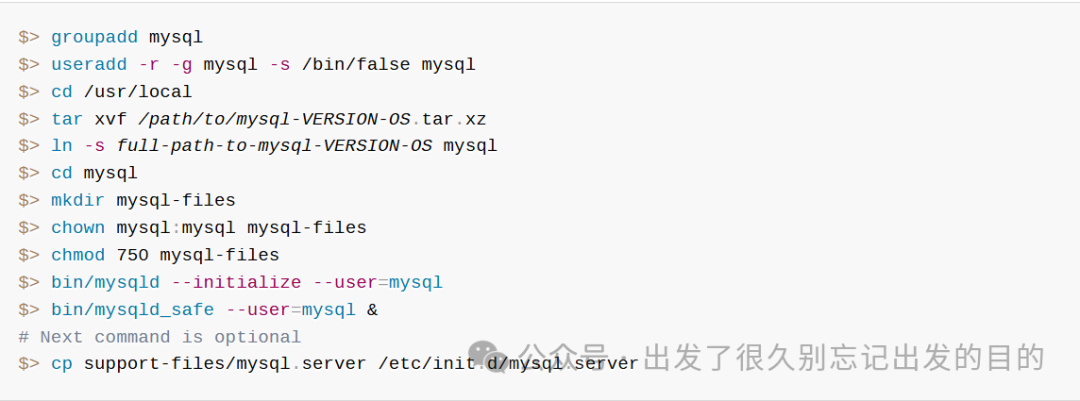
“2.2 Installing MySQL on Unix/Linux Using Generic Binaries”:
详见:https://dev.mysql.com/doc/refman/9.2/en/binary-installation.html
详见:https://dev.mysql.com/doc/refman/9.2/en/docker-mysql-getting-started.html



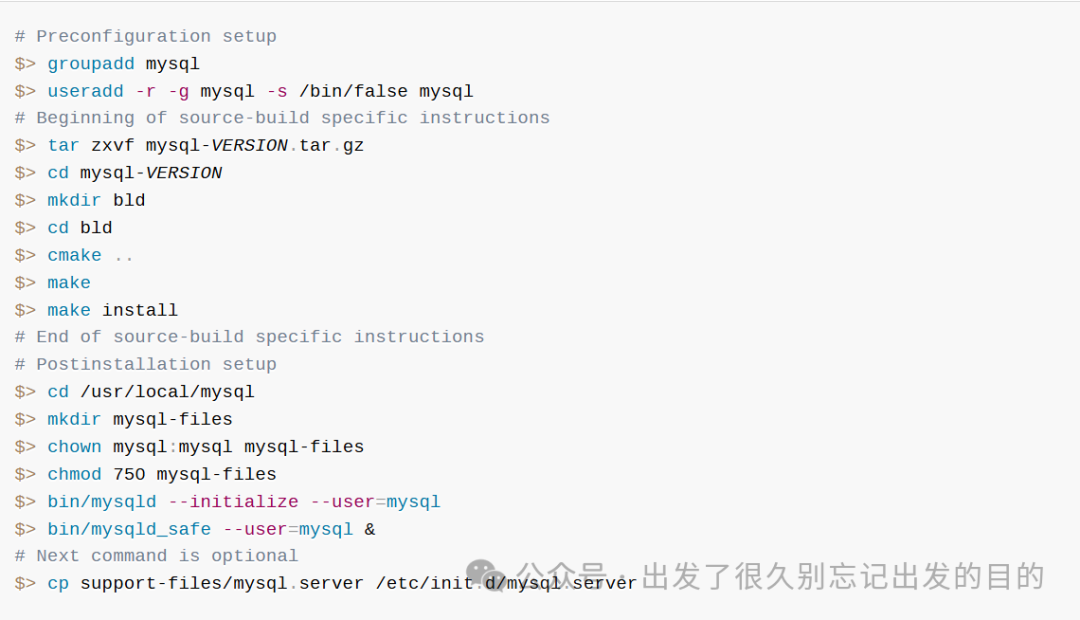
详见:https://dev.mysql.com/doc/refman/9.2/en/installing-source-distribution.html
# 进入容器:docker exec -it mysql bash# mysql客户端:mysql -uroot -proothttps://www.mysql.com/https://github.com/mysql/mysql-serverhttps://github.com/docker-library/mysql

 支付宝微信扫一扫,打赏作者吧~
本文链接:https://kinber.cn/post/6139.html 转载需授权!
推荐本站淘宝优惠价购买喜欢的宝贝:

 您阅读本篇文章共花了: